Romeo Juliet Font Duo: Achieving Authentic Vintage Style Without the Common Pitfalls
In the ever-expanding world of digital design, the allure of a cool retro or vintage style font duo is undeniable. It promises instant character, a touch of nostalgia, and a cohesive aesthetic that single fonts often struggle to deliver on their own. The Romeo Juliet Font Duo is a perfect case study, pairing a hand-drawn brush script with a bold, grungy display type. On the surface, it seems like a one-stop solution for logos, branding, and social media graphics. However, the path from downloading a font duo to achieving professional, effective results is fraught with subtle missteps that can undermine your project's impact and your own efficiency.
Understanding the Components: More Than Just Two Fonts
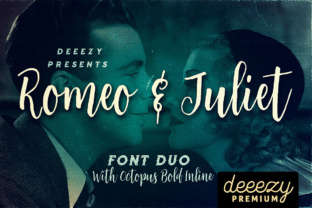
Before diving into common errors, it's crucial to understand what you're working with. The Romeo Juliet Font Duo isn't simply two typefaces sold together; it's a carefully considered pairing designed for contrast and harmony.
- The Script (Romeo): This is the hand-drawn, unique brush script. Its strength lies in its organic feel and extensive features, including multi-language support and a wealth of stylistic alternates and swashes. These extras are not decorative afterthoughts; they are essential tools for creating authentic, varied letterforms that avoid the repetitive, digital look of basic script fonts.
- The Display (Juliet): This is the bold, regular grunge version display font. It's built for impact and headlines. A critical detail to note is its lack of multi-language support. This is a common characteristic of stylized display fonts and a frequent oversight by buyers.
The duo works because the rugged, stable Juliet grounds the flowing, expressive Romeo. Recognizing their individual roles is the first step to using them effectively.
The First Major Mistake: Ignoring Language and Character Support
One of the most frequent and frustrating errors occurs when creators download the Romeo Juliet Font Duo without verifying its compatibility with their specific language needs. This is especially true for the display component, Juliet.
The Problem: A designer working on a brand for a European client might select the Juliet font for a headline, only to discover mid-project that it lacks essential characters like accented letters (é, ñ, ö) or specific symbols. This forces an emergency search for a replacement font, derailing the project timeline and compromising the established visual identity.
The Better Approach:
- Pre-Purchase Check: Before buying, always examine the font specimen sheet or character map provided by the foundry. Don't assume support; verify it.
- Test Before Committing: Use the font's "test drive" feature on the sales page. Type out the exact text you plan to use, including any non-English characters, numbers, and punctuation.
- Plan Your Pairing: If your project requires multi-language support for headlines, you may need to use Juliet only for the primary English tagline and pair it with a more versatile, complementary sans-serif for supporting text in other languages.
Overlooking the Power of Stylistic Alternates
The script font, Romeo, is packed with potential, but many users only scratch the surface. They type their words and call it done, resulting in a look that is passable but generic and repetitive.
The Problem: When you type the word "love" and both instances of the letter 'o' and 'e' are identical, it creates a mechanical, copy-pasted feel that betrays the hand-drawn nature of the font. This misses the entire point of investing in a high-quality script with stylistic alternates.
The Better Approach:
- Learn Basic OpenType Features: In your design software (like Adobe Illustrator, Photoshop, or Affinity Designer), explore the Glyphs panel or OpenType features. Look for "Stylistic Alternates," "Swashes," and "Contextual Alternates."
- Create Natural Variation: Manually select individual letters and cycle through their alternate forms. Swap a standard 'g' for a looped one, or add a swash to the beginning or end of a word. This mimics how a real hand would write, adding rhythm and authenticity.
- Avoid Overuse: Balance is key. Applying a swash to every letter or making every alternate ornate can make text illegible. Use these features strategically to highlight key words or add flair to initials and endings.
Misapplying the Font Duo's Aesthetic
A vintage style font duo carries a strong mood. Applying it to the wrong context is like wearing a tuxedo to a beach barbecue—it's mismatched and ineffective.
The Problem: Using the Romeo Juliet duo for a corporate law firm's website or a cutting-edge tech startup's branding can confuse the audience. The retro, grunge aesthetic communicates creativity, warmth, craftsmanship, or nostalgia, not sterile professionalism or futuristic innovation.
The Better Approach:
- Define Your Brand Voice First: Is your brand voice playful, artisanal, rebellious, or nostalgic? If yes, a cool retro font duo is a strong choice.
- Match the Era and Vibe: Consider the specific vintage era you're evoking. The Romeo Juliet duo leans towards a mid-century, hand-lettered feel. It's perfect for coffee shops, barber studios, indie breweries, vintage clothing labels, or event invitations.
- Use Sparingly for Modern Brands: If you have a modern brand but want a touch of vintage character, use the duo only for a single element, like a logo mark or a promotional poster, while keeping the main body text in a clean, contemporary font.
Practical Steps for Evaluation and Implementation
Before you click "download" on the Romeo Juliet Font Duo, run through this checklist to ensure it's the right tool for your job:
- Audit Your Project Needs: Does your text require special characters? What is the primary language? Will the text be used at very small sizes (where intricate swashes might blur)?
- Evaluate the Pairing in Context: Don't just look at the fonts in isolation. Use the foundry's preview images or mock up a quick design with your own text. See how the script and display fonts interact with your planned color palette and imagery.
- Consider the Long-Term Use: Will you need this font for a one-off project or for an entire brand system? For a brand, ensure the display font's limitations won't cause future headaches as your content needs evolve.
- Test for Legibility: Print out a test or view it on different screens. Can you easily read the script font at the size you intend to use it for body text (if at all)? Is the grunge texture on the display font too heavy for small headings?
Ultimately, the Romeo Juliet Font Duo is a powerful asset for the right projects. Its value is unlocked not just by its inherent design quality, but by the thoughtful and informed way you deploy it. By respecting the distinct roles of each font, exploring its full feature set, and aligning its strong personality with your project's goals, you move beyond simply using a font to truly mastering a typographic tool. This mindful approach prevents wasted time, avoids design clichés, and ensures your final presentation communicates exactly the vintage charm and professional polish you intended.