Integrating Quick Chicken Font into Your Creative Workflow
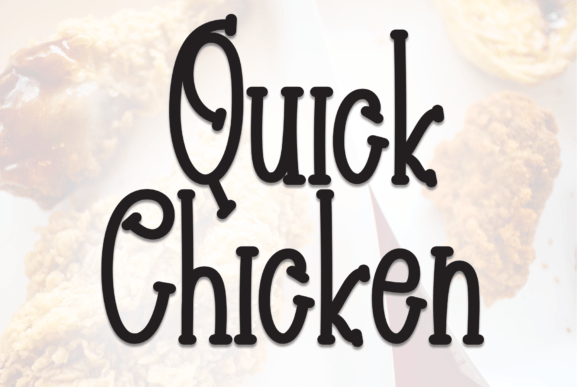
In the world of design and digital creation, typography is often the silent workhorse that carries the emotional weight of a project. While serif fonts denote authority and sans-serifs scream modernity, display fonts like Quick Chicken Font serve a distinct, vital purpose: they inject personality. Quick Chicken is a sweet, friendly handwritten display font that bridges the gap between casual fun and intentional design. It is not merely a collection of glyphs; it is a tool for establishing tone. For professionals ranging from graphic designers and event planners to educators and small business owners, understanding how to operationalize a font like Quick Chicken is key to efficient workflows and high-quality output.
Understanding the Asset: Beyond Aesthetics
Before integrating Quick Chicken into a project pipeline, it is necessary to define its technical and aesthetic boundaries. This is a handwritten display typeface. In practical terms, this means it is designed for headlines, logos, and short bursts of text rather than long-form body copy. Its legibility drops significantly when used at small sizes or in dense paragraphs.
The "sweet and friendly" nature of Quick Chicken makes it ideal for specific use cases. It mimics the organic imperfections of human handwriting, which psychologically signals approachability and warmth to the viewer. In a broader design system, this font acts as a contrast element. It pairs well with clean, neutral sans-serif fonts (like Roboto, Open Sans, or Lato) to create visual hierarchy. The workflow implication here is clear: Quick Chicken should be selected as an accent font, not a primary body font.
Strategic Implementation: Where Quick Chicken Fits
Effective design workflows rely on matching the right asset to the right phase of a project. Quick Chicken Font is versatile, but its utility shines in specific stages of production.
1. Event Stationery and Wedding Invitations
The most traditional application for a font of this style is in the stationery industry. Wedding invitations, save-the-dates, and RSVP cards require a delicate balance of elegance and personality.
- Pre-Production Planning: When drafting the timeline for a stationery suite, identify the hierarchy of information immediately. Use Quick Chicken for the names of the couple and the main headings (e.g., "You're Invited").
- Execution: Set the body text (venue details, dress code, registry information) in a highly legible serif or sans-serif. This ensures that while the invitation feels fun, the logistical details remain functional.
- Output: Because this is a display font, ensure high-resolution output (300 DPI minimum) to capture the nuances of the letterforms without pixelation.
2. Branding for Small Businesses and Entrepreneurs
For small business owners, particularly in sectors like baking, children's apparel, pet grooming, or artisanal crafts, brand identity needs to be inviting. Quick Chicken can serve as a logotype or a secondary brand font.
Consider a workflow where a bakery owner is refreshing their menu. Using Quick Chicken for section headers like "Daily Specials" or "Sweet Treats" creates an immediate association with the product. The process involves downloading the font, installing it into the system's font library, and then accessing it via standard design software like Adobe Illustrator, Canva, or Procreate.
3. Digital Content and Social Media
Marketers and content creators often struggle to stop the scroll. A bold, handwritten font breaks the monotony of standard web-safe fonts used in social feeds. Quick Chicken is excellent for Instagram stories, YouTube thumbnails, or podcast cover art.
- Workflow Integration: Create a brand kit within your preferred design tool. Upload Quick Chicken as a custom font. When creating a template for weekly updates, apply Quick Chicken to the "Hook" or main headline to draw the eye.
- Compatibility Check: Always test the font on mobile devices. Since most social media is consumed on phones, ensure the "friendly" aesthetic doesn't become cluttered on smaller screens.
The Design Process: Pairing and Hierarchy
One of the most common pitfalls in using display fonts is poor pairing. If Quick Chicken is used alongside a font that is too similar (like another script font), the result is visual chaos. If used with a font that is too rigid without proper spacing, it can look awkward.
The 80/20 Rule of Typography:
Adopt a workflow where 80% of your text is utilitarian (readable, structured) and 20% is decorative (Quick Chicken). This ensures that the design remains professional while retaining that "cute and fun" touch.
For example, if you are designing a flyer for a local community event:
- Headline: "Annual Summer Picnic" in Quick Chicken Font.
- Sub-headline: "Join us for food and fun!" in a clean sans-serif.
- Details: Date, time, and location in a standard sans-serif for maximum legibility.
This structure guides the reader's eye naturally from the emotive hook to the practical information.
Technical Workflow and File Management
For freelancers and agencies managing multiple assets, organization is as important as creativity. When incorporating a new font like Quick Chicken into your toolkit, consider the following technical steps:
- Font Management: Use a font manager (like FontBase or Suitcase Fusion) to activate and deactivate fonts. Keeping too many display fonts active can slow down system performance and clutter your design software dropdowns. Activate Quick Chicken only when working on relevant projects.
- Licensing and Compliance: Before purchasing or downloading, verify the license. Does it cover commercial use? Is it limited to personal projects? Embed this information in your asset management system so that invoicing and legal compliance are seamless.
- File Naming Conventions: When saving projects that utilize this font, tag the file with the font name (e.g., "ProjectX_Invitation_QuickChicken_v1"). This prevents "font not found" errors if you revisit the project months later on a different machine.
Optimizing for Different Mediums
The execution of a design changes based on the medium. A font that looks perfect on a website may fail in print, and vice versa.
Print Production
When sending files to a printer, particularly for wedding invitations or business cards, you must outline your fonts or embed them in the PDF. Quick Chicken, with its unique curves, requires vector outlines to ensure the printer renders it exactly as seen on screen. During the pre-flight check of your document, verify that the font has been converted to paths to avoid substitution errors.
Digital and Web Use
If you plan to use Quick Chicken on a website (e.g., for a logo or a specific banner), you cannot simply upload the desktop font file. It must be converted to web formats (WOFF, WOFF2) or hosted via a service like Adobe Fonts or Google Fonts if available. However, for a display font like this, it is often more efficient to save the text as an image (SVG or PNG) to maintain the exact styling without relying on the user's browser to render the font.
Quality Control and Refinement
Handwritten fonts often feature "alternates" and "ligatures"—variations of letters that create a more authentic handwriting look. A robust workflow involves reviewing the text after typing to see if consecutive letters look too repetitive.
For instance, if you type "Hello," check the two 'l's. In many display fonts, they will look identical. If Quick Chicken supports contextual alternates, enable this feature in your design software (usually found in the OpenType panel) to swap out the second 'l' for a different style. This small step elevates the design from "font on a page" to "custom typography."
Conclusion: Elevating the Everyday
Quick Chicken Font is more than just a whimsical typeface; it is a functional tool for adding emotional resonance to a project. Whether you are a freelancer crafting a pitch deck, a parent making birthday invitations, or a marketer designing a holiday campaign, the value lies in the execution. By treating the font as a strategic asset—planning its hierarchy, ensuring technical compatibility, and pairing it intelligently—you can transform standard communications into engaging, memorable experiences. The goal is not just to use a font, but to implement a design solution that connects with the audience effectively.