Christmas Font: A Festive Color Font for Holiday Projects
The holiday season is a time of warmth, nostalgia, and vibrant color. For designers, crafters, and small business owners, capturing that specific festive spirit in a visual project can be the difference between something that feels generic and something that truly resonates. This is where a specialized typeface like Christmas Font enters the picture. It's not just another script or serif; it's a color font designed specifically to inject a cute, celebratory aesthetic directly into your work, saving you from complex layering or coloring steps in post-production.
Understanding the Unique Appeal of a Color Font
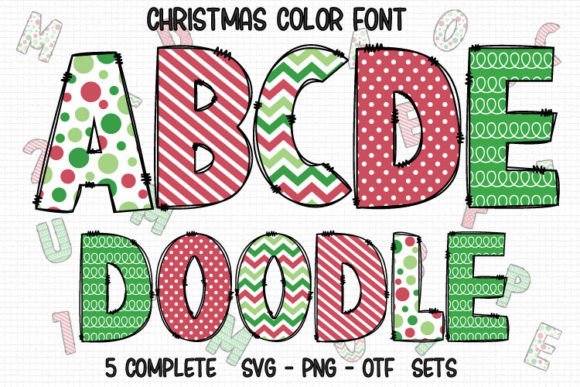
A traditional font is a single-color tool. You type, and you get a glyph in black, or you manually change its color. Christmas Font operates differently. As a color font, its letterforms are pre-designed with multiple colors, gradients, or even textures embedded within the font file itself. This means when you type the word "Joy," each letter can instantly appear with a festive red, green, and gold palette, complete with subtle shading or patterns. This feature is a significant time-saver for anyone creating holiday materials. Instead of painstakingly coloring each letter or adding effects in a graphics program, you achieve a polished, multi-colored result in a single step. The value is immediate: faster workflow, consistent festive coloring across all characters, and a professional look that can be difficult to achieve manually, especially for those less experienced with advanced design software.
Practical Applications for Creators and Businesses
The utility of a font like this spans a wide range of projects. For small business owners and marketers, it can transform a holiday social media graphic, email newsletter header, or promotional flyer. The instant festive flair helps content stand out in a crowded feed and aligns messaging with the seasonal mood without requiring a designer's expertise. Educators and bloggers can use it to create engaging classroom materials, festive blog post titles, or downloadable activity sheets that feel special and seasonally appropriate. Hobbyists and crafters find it invaluable for personal projects. Imagine creating personalized Christmas cards, gift tags, or scrapbook layouts where the text itself is a decorative element. The font does the heavy lifting, allowing the creator to focus on layout and personalization.
Navigating Compatibility: Choosing the Right Version for Your Tools
This is a critical practical consideration. Christmas Font is available in different versions, and choosing the correct one for your intended software and hardware is essential for a smooth experience. The font is offered in a black version and a color version, each with distinct compatibility.
The black version functions like a standard font file. It is fully compatible with a broad range of software, including Cricut Design Space, Silhouette Studio, and other popular cutting machine software. If your primary goal is to use the unique shapes and letterforms of Christmas Font for vinyl decals, paper cutouts, or embroidery files where you will apply a single color (like vinyl or thread) later, this is the version you need. It provides the charming, festive letter shapes without the built-in color data, making it universally usable in vector-based design and cutting environments.
The color version is where the multi-hued magic happens. However, its compatibility is more specialized. The OTF and TTF files containing the embedded color data are not compatible with Cricut Design Space. This is a hardware and software limitation, not a shortcoming of the font itself. The color version is designed for use in advanced graphic design programs that support the OpenType-SVG color font standard. These include Adobe Photoshop, Adobe Illustrator, Silhouette Studio Designer Edition, and Inkscape (with recent versions supporting color fonts). In these applications, you can type with the full color palette intact.
Therefore, the decision tree is straightforward: if you are designing for a Cricut machine or require a single-color outline, select the black version. If you are creating digital designs for print, web, or social media using Photoshop or Illustrator, the color version will give you the intended festive effect. Understanding this distinction prevents frustration and ensures the font enhances, rather than complicates, your creative process.
Maximizing the Impact of Festive Typography
Using a decorative font like Christmas Font effectively involves more than just selecting it from a menu. To ensure it strengthens your communication and improves presentation, consider these practical tips:
- Pair with Simplicity: Christmas Font is a showstopper. Its detailed, colorful nature means it works best as a headline or focal point. Pair it with a clean, simple sans-serif or serif font for body text to maintain readability and visual balance. Let the festive font carry the celebratory tone without overwhelming the entire design.
- Consider Scale and Context: The intricate details and colors may become lost or appear cluttered at very small sizes. It's ideal for larger text elements like titles, headers, or short phrases on cards and posters. Test it at the intended output size to ensure legibility.
- Leverage the Color Palette: The pre-set colors in the color version are designed to be harmonious and festive. Use this to your advantage by pulling one or two of those colors from the font to use as accents in other parts of your design—such as borders, backgrounds, or illustrations—to create a cohesive visual theme.
- Understand Its Personality: The font is described as "cute and festive." This suggests a particular aesthetic—likely playful, rounded, and joyful. It's perfect for family-oriented projects, children's holiday events, or brands with a whimsical, friendly voice. It may be less suited for formal, corporate, or minimalist holiday communications where a more restrained typeface would be appropriate.
Who Stands to Benefit the Most?
While anyone creating holiday-themed content could find a use for it, certain groups will derive the most value:
- DIY Crafters and Hobbyists: For those using Silhouette or other compatible software for personal projects, the color version can elevate homemade cards, ornaments, and gifts to a professional-looking level with minimal effort.
- Content Creators and Social Media Managers: The need for quick, eye-catching visuals is constant. Having a festive color font in the toolkit can streamline the creation of dozens of unique holiday-themed posts, stories, and banners throughout the season.
- Small Business Owners (especially in retail, crafts, or family services): Creating a cohesive holiday brand experience—from website graphics to in-store signage and packaging—becomes much simpler. The font provides a consistent, recognizable festive element across all touchpoints.
- Educators and Community Organizers: For creating flyers, event programs, and classroom materials that need to feel special and seasonally engaging without a budget for a professional designer.
Ultimately, Christmas Font is a specialized tool designed to solve a specific problem: efficiently adding a multi-colored, festive typographic element to holiday designs. Its value lies in its ability to save time, ensure consistency, and provide an instant aesthetic boost. By carefully considering its compatibility and applying it thoughtfully within a design, users across various fields can leverage it to create more engaging, seasonally resonant projects that capture the joyful essence of the holidays.